Fix the address. Skip the ticket.
A missing apartment number or a checkout typo shouldn't need your support team. Customers can correct their shipping address, with autocomplete and validation on their edits.
Alfred Order Edits · Shopify order editing
The wrong address. The wrong size. A change of mind. Give customers a simple way to sort it out before fulfillment, under rules you control.
Built and in Shopify review. Get an email when we launch.
Your storefront
ORDER #1042
A little change? No problem.
Sand / M
Qty 1Your store. Your customer. Your rules.
THE LITTLE THINGS, HANDLED
Give customers a clear path to the changes they need most, while your team focuses on the conversations that need a human.
A missing apartment number or a checkout typo shouldn't need your support team. Customers can correct their shipping address, with autocomplete and validation on their edits.
Offer in-stock size and style swaps before fulfillment. You choose the products and swaps customers can make, and they review the change before saving.
Let eligible customers cancel with a clear refund preview. Choose instant cancellation or approval first, and offer an address fix or a swap when that solves the problem.
FROM “OOPS” TO SORTED
A few clear screens can save a whole conversation. Explore the three main workflows: correct an address, swap items, or cancel an eligible order. Then see how shoppers review the outcome and get confirmation.
Product design mockups with sample orders. Available changes depend on your store settings and each order's eligibility.
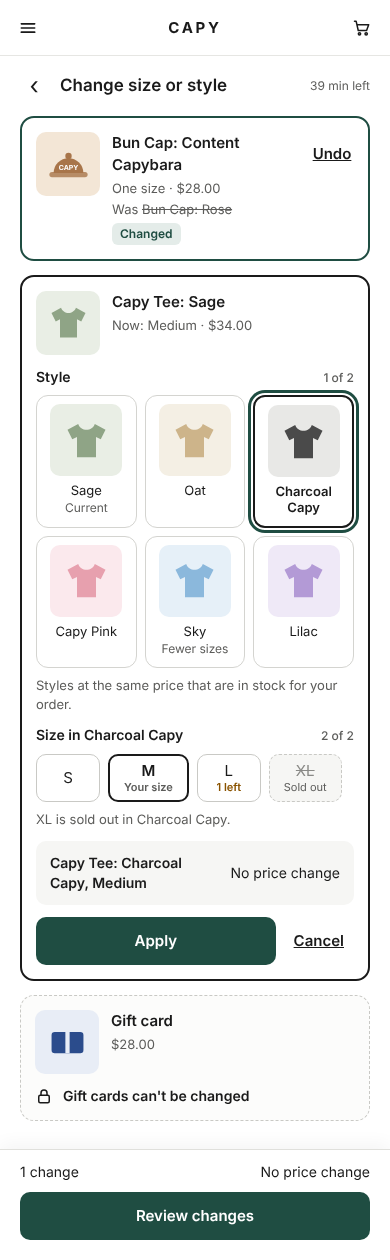
Showing example: Swap items.
A CALMER POST-CHECKOUT EXPERIENCE
YOUR ORDER
Make your changes before your order goes to the warehouse.
Jordan Lee · 1420 Pine St, Apt 4B
Seattle, WA 98101
Not quite the right fit? Explore available sizes and styles.
Change size or styleSee your refund before deciding. This sample order is eligible for cancellation.
Cancel orderAdd an edit link to confirmation emails, the thank-you page, order status and customer accounts. Customers can also request a link from your store's lookup page.
Your edit window, enabled changes and store rules decide what each customer can do. If a change isn't available, the page explains why.
Customers see the outcome before confirming. Your team gets a record in Activity, with order tags and timeline notes to keep everyone in the loop.
SELF-SERVICE, WITH BOUNDARIES
Convenience for customers shouldn't mean giving up control of your operations. Alfred checks what is allowed before a change goes through.
Be there at launchSet your editing period around your fulfillment process, with optional Shopify fulfillment holds.
Protect final sale items, restrict address changes, and set limits by order or customer conditions.
Let support tools check your policy and have Alfred email a secure link to the customer. The customer stays in charge of the change.
BUILT WITH AI SUPPORT IN MIND
Give your agent more than a generic answer to “Can I change my order?” Alfred provides the store policy, this order's eligibility, and a safe next step through a native MCP server and Agent API.
The agent guides. The customer confirms.
v1 tools never commit changes to an order.
{
  "name": "get_edit_options",
  "arguments": {
    "order_number": "#1042",
    "customer_email": "customer@example.com",
    "action": "address"
  }
}{
"can_edit": true,
"link_sent_to_order_email": true
}Explain your editing window, enabled changes and payment rules before a customer starts.
Use the order number and matching email to check eligibility and explain any restrictions.
A link-only agent can ask Alfred to email the edit link. The customer makes and confirms the change.
get_edit_policyExplain the policyget_edit_optionsCheck this ordercreate_edit_linkSend the safe next steppreview_editPreview the outcomeget_edit_historyUnderstand what happenedSame tools over MCP and REST. Server-enforced trust levels, rate limits and an audit trail. Available with the app at launch.
PAY FOR THE WORK IT DOES
Every feature on every plan. Choose your allowance around the changes your customers actually make.
Prelaunch pricing, subject to change. Paid usage above the included allowance is billed separately, up to an approved cap.
A FEW THINGS TO KNOW
The first version is built and is in Shopify's app review process. We're aiming to launch in the next one to two months, but timing depends on Shopify's review. Join the waitlist for launch updates; we won't promise a date before we know it.
The core experience covers shipping address corrections, in-stock size and style swaps, and cancellation before fulfillment. You choose which changes are enabled. Availability also depends on the order, payment method and your rules. Item-editing availability will be confirmed at launch. Shipping-method changes and post-fulfillment returns are not included.
Yes. Choose a time after purchase, a daily cutoff in your store's timezone, or an until-fulfilled window. Store-specific rules can restrict changes further. Optional fulfillment holds help keep eligible orders from being picked while editing is open; confirm your fulfillment partner respects Shopify holds before enabling them.
AI support agents can check your policy, inspect order eligibility, preview a change and read edit history through the Agent API or MCP (Model Context Protocol). A link-only agent can ask Alfred to email a secure edit link directly to the address on the order. Links are never returned to the agent. The customer completes the change under your rules. The v1 agent tools do not change orders themselves.
No. Alfred Order Edits handles changes before fulfillment. Your returns and exchanges process takes over after an order has shipped.
We register your interest in Alfred Order Edits and use your email for its launch updates. There is no payment, installation or commitment. You can unsubscribe from marketing emails at any time; existing unsubscribe preferences are respected.
Yes. Alfred Order Edits includes a stateless Streamable HTTP MCP server and a REST API exposing the same five tools. They use store-scoped Bearer keys, server-enforced trust levels, rate limits and an agent-call audit trail. Connection access is available after installation when the app launches.
No. In v1, agents cannot commit an order change, cancel an order or change merchant settings. They can check and preview what is permitted, and link-only agents can trigger an edit-link email to the order's own address. Customers confirm changes on the storefront edit page.
THE NEXT APP IN YOUR ALFRED TOOLKIT
Alfred Order Edits is in Shopify review. Leave your email for launch updates, and keep running your store in the meantime.